If you’re searching for the perfect ergonomic gaming desk setup, you’re likely tired of back pain, wrist strain, or long sessions that leave you feeling worse than when you started. The right setup isn’t just about aesthetics—it directly impacts your performance, focus, and long-term health.
This guide breaks down exactly what you need to build a comfortable, efficient, and performance-optimized gaming space. From desk height and monitor positioning to chair support, controller placement, and cable management, we’ll walk you through practical adjustments that make an immediate difference.
Our recommendations are grounded in gaming mechanics analysis, real-world multiplayer performance demands, and hands-on testing of popular gear configurations. We combine trend tracking with practical setup strategies to ensure every tip is actionable—not just theoretical.
By the end of this article, you’ll know how to create a setup that supports longer sessions, sharper reflexes, and consistent comfort without unnecessary upgrades or wasted money.
From Marathon Sessions to Peak Performance: Your Ergonomic Blueprint
Desk and Peripheral Showdown
An ergonomic gaming desk setup isn’t just aesthetic; it’s biomechanics in action. Consider Desk A: fixed height, minimal cable space. Desk B: with monitor arms. Research from OSHA shows wrist and elbow angles reduce strain injuries (defined as repetitive stress damage to muscles and tendons). Likewise, membrane keyboards feel soft, but mechanical switches offer actuation—meaning the key registers sooner. Some argue comfort is secondary to skill. However, fatigue slows reaction time, like a lag spike in Call of Duty. Pro tip: elbows ninety degrees.
Why Ergonomics Isn’t Just a Buzzword—It’s Your Secret Weapon
Let’s start with the health angle. Poor posture during long sessions can lead to Repetitive Strain Injury (RSI)—a condition caused by repeated stress on muscles and tendons—along with chronic back pain and neck strain (Mayo Clinic). That “just one more match” mindset? It adds up fast. An ergonomic gaming desk setup reduces joint pressure, keeps your spine aligned, and prevents small aches from turning into long-term problems.
Now the performance boost. Comfort isn’t a luxury—it’s a stat multiplier. When your body isn’t screaming for a break, your brain stays locked in. Benefits include:
- Faster reaction times
- More consistent aim
- Better focus deep into marathon sessions
Studies show physical discomfort reduces cognitive performance (NIH). Translation: pain equals lost games.
Finally, think long-term. Protecting your body today means more years competing at your peak. Fewer injuries. Longer sessions. Higher skill ceiling. That’s not hype—that’s durability.
Choosing Your Command Center: The Core Features of an Ergonomic Desk
Height Adjustability: The Sit-Stand Advantage
An adjustable desk isn’t a luxury—it’s a PERFORMANCE TOOL. Height adjustability means the desk can move up or down so you can alternate between sitting and standing. Research shows prolonged sitting is linked to increased back pain and cardiovascular risk (Mayo Clinic). Switching positions improves circulation and focus.
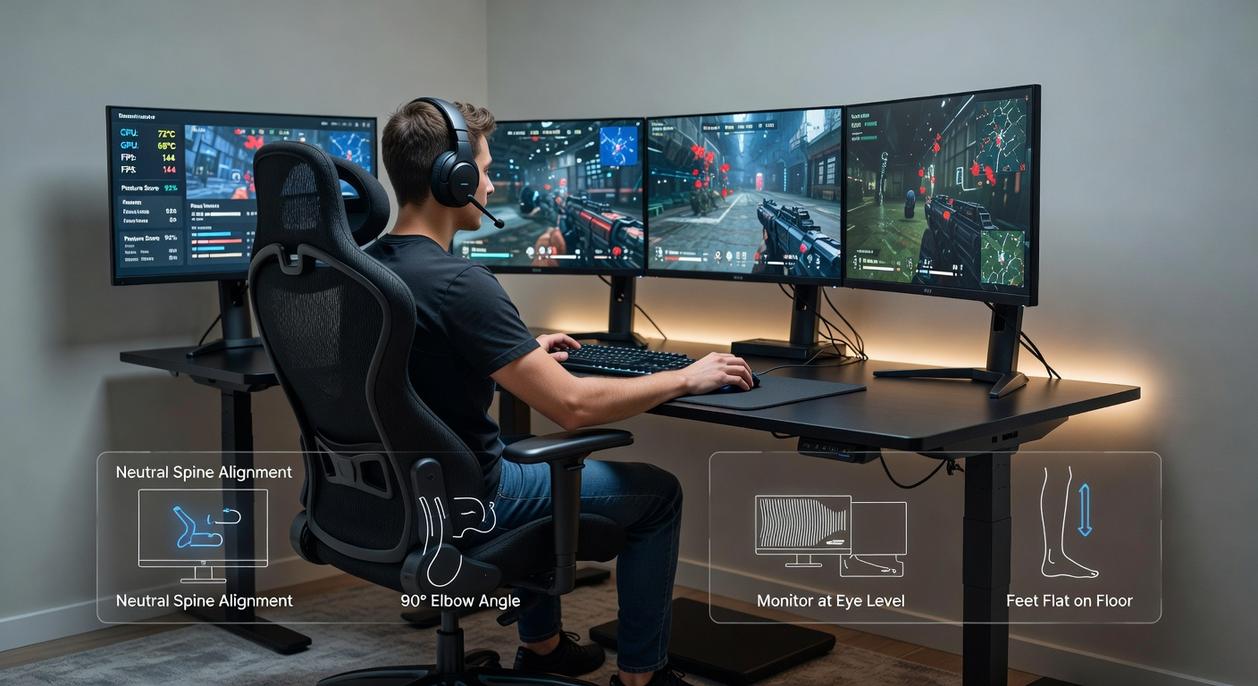
For sitting, aim for elbows at a 90-degree angle, wrists neutral, and feet flat. For standing, your monitor top should sit at or slightly below eye level, with shoulders relaxed. If your neck cranes like you’re in a horror movie, it’s too high. My recommendation: choose a motorized desk with memory presets so you actually USE the feature (pro tip: set reminders to switch every 45–60 minutes).
Surface Area & Depth: “More Is More”
Low-DPI gamers need wide mouse arcs. That requires depth and width—at least 60 inches wide and 30 inches deep if you’re running dual monitors. A cramped desk sabotages precision and posture. Think of it like upgrading from a studio apartment to a loft—same you, way more freedom. For a true ergonomic gaming desk setup, prioritize space before aesthetics.
Material and Stability: Why a Wobble-Free Zone Matters
Wood offers durability, laminate is budget-friendly, and steel frames provide maximum rigidity. Stability matters because micro-wobbles disrupt aim and immersion. Choose a steel frame rated for high weight capacity—NO SHAKE, NO DISTRACTIONS.
Integrated Cable Management: The Unsung Hero of Efficiency
Built-in trays and grommets prevent cable drag during flick shots. A clean desk reduces cognitive load (Princeton Neuroscience Institute). Pair this with guidance from how to optimize your gaming controller settings for better performance to eliminate friction—digitally and physically.
The Efficiency Layout: Arranging Your Gear for Flawless Gameplay
Monitor Placement for Optimal Vision: The “Arm’s Length” Rule
First things first, your monitor should sit about an arm’s length away, with the top of the screen at or slightly below eye level. This reduces cervical spine strain (that stiff-neck feeling after a five-hour ranked grind). In competitive FPS circles—from local LAN cafés to regional esports bootcamps—players follow this rule to maintain peripheral awareness without tilting the head. If you’re craning upward, you’re bleeding focus. Adjust the stand or use a VESA mount; small tweaks, big gains.
Keyboard and Mouse Positioning: The Neutral Wrist Principle
Next, keep elbows at roughly 90 degrees and wrists straight. “Neutral wrist” simply means your hands aren’t bent up, down, or sideways. That alignment lowers pressure on the median nerve, reducing carpal tunnel risk (Mayo Clinic). Some argue angled keyboards feel faster. However, speed without joint alignment invites fatigue. Precision drops when discomfort rises.
Creating “Action Zones”
Now, divide your desk into zones. Your primary zone houses keyboard and mouse. Secondary zones hold headset, controller, or stream deck—close, but never overlapping your movement arc. Think of it like cooldown management in an MMO: everything has a place, and clutter is the real boss fight.
| Zone | Items | Purpose |
|——|——-|———-|
| Primary | Keyboard, Mouse | Core input |
| Secondary | Headset, Controller | Quick access |
| Peripheral | Stream deck, charger | Support tools |
Mousepad Real Estate: Maximizing Your Aiming Surface
Finally, a large desk mat is non-negotiable. It supports consistent DPI tracking and smooth flick shots while cushioning wrists. In any ergonomic gaming desk setup, unrestricted glide equals cleaner crosshair placement. Pro tip: choose a stitched-edge pad to prevent fraying during high-friction sessions.
Beyond the Desk: Completing the Ergonomic Ecosystem
Start with an anecdote about a marathon raid that left your back throbbing.
I once finished a six-hour session and realized my chair—not my aim—was the weak link. That’s when I learned the throne is everything. An ergonomic chair (a seat designed to support neutral spine alignment) should offer lumbar support, adjustable armrests, and proper seat depth so your hips sit slightly above your knees. These features sync with your ergonomic gaming desk setup, not compete with it.
Lighting matters too. Bias lighting (a soft glow placed behind your monitor) reduces contrast and eye fatigue, a trick cinematographers use to keep scenes comfortable to watch (your eyes will thank you).
For controller fans, keep wrists neutral and avoid bending them upward; ergonomic grips can distribute pressure and prevent strain. I used to ignore this—until numb fingers proved otherwise. Small tweaks win long games.
Your New High Score in Health and Performance
You no longer have to accept pain and fatigue as the price of a long gaming session. This guide proved that an ergonomic gaming desk setup unlocks comfort and competitive efficiency. Maybe you thought soreness was just part of the grind (spoiler: it’s not). By thoughtfully choosing and arranging your desk and gear, you build a system that supports your body and sharpens your skills.
- Raise your monitor to eye level.
- Clear space for fearless mouse flicks.
Start with one small tweak today and feel the difference in next match.
Level Up Your Gaming Setup and Strategy Today
You came here looking for smarter ways to improve your gameplay, optimize your setup, and stay ahead of emerging trends. Now you have a clearer understanding of the mechanics, multiplayer strategies, and practical adjustments that separate casual players from consistent performers.
The truth is, most players struggle not because they lack skill, but because they overlook the fundamentals—smart controller configurations, refined in-game tactics, and a proper ergonomic gaming desk setup that supports long, focused sessions without fatigue. Those small inefficiencies add up and quietly hold you back.
Now it’s your move.
Start by fine-tuning your controller settings, applying one new multiplayer strategy in your next session, and upgrading to an ergonomic gaming desk setup that protects your performance and endurance. If you’re serious about gaining an edge, follow our latest guides and trend breakdowns—trusted by competitive and indie gamers alike—to stay ahead of the curve.
Don’t settle for average gameplay. Optimize your setup, sharpen your strategy, and start winning smarter today.